
Now you need to write an email, prepare a report, and find a clear way to explain an idea to your team.
These are ordinary tasks, but they consume a surprising amount of the week. They are good places to try AI, particularly when you already know what a useful result should look like.
You don’t need an elaborate setup to begin. You can give an AI assistant your notes, explain what you need, and ask it to help organize or draft the work. The challenge is learning where that assistance earns its place—and how to improve the output without spending all the time you hoped to save.
A sensible approach starts with a familiar task, a clear brief, and a review process. From there, you can build a few habits that make AI useful in your day-to-day work.
Look for the Tasks That Keep Coming Back
Before choosing a tool, think about where your time goes.
You might write similar emails every week, prepare updates from several documents, or turn customer conversations into notes for the rest of the team. Each task requires attention, but some of that effort involves arranging information you already have.
Those are promising starting points.
A business owner could use AI to draft answers to common customer questions from an approved policy. A manager could turn meeting notes into a proposed list of decisions, owners, and deadlines. A marketer could use it to explore different ways to explain an offer, then develop the strongest idea.
For personal tasks, it might help organize a project, prepare questions for an appointment, or compare options using information you provide.
Choose work you can assess confidently. If you regularly prepare the weekly report, you will notice when a summary leaves out an important result. If you know your customers, you can judge whether a draft email sounds appropriate.
That familiarity gives you a useful advantage during the trial. You can tell the difference between a convincing response and one that actually helps.
Research suggests that the productivity benefit can be meaningful when the tool fits the work. A 2023 NBER summary of a customer-support study reported an average increase of nearly 14% in issues resolved per hour, with larger gains among less experienced workers. The result came from a particular company and task, so it offers evidence of potential rather than a forecast for every business.
Give AI the Brief You Would Give a Colleague

A short request can work well when the assignment is simple. More involved work needs context.
“Write a customer email” leaves several questions unanswered. Who is receiving it? What happened? What should they know? What do you want them to do next?
The assistant will produce something, but you may spend the next ten minutes correcting assumptions it should never have made.
A better brief explains the purpose, the audience, the relevant facts, and the shape of the finished work. Here is an example:
Write a welcome email for customers who purchased our online training program today. Explain how to access the first lesson, suggest a manageable starting schedule, and tell them where to get help. Use the program details below. Keep it around 250 words and make it sound friendly and clear. Do not add features or promises that are missing from the notes.
This gives the assistant enough direction to make useful choices.
You can improve the brief further with an example of work you like. Share an approved email and describe what works about it: perhaps the opening is direct, the explanation feels relaxed, and the next step is easy to follow.
For reports, provide the definitions behind your numbers. For customer replies, supply the current policy. For an article, explain the reader’s likely experience and what you want them to learn.
Role instructions such as “act as an editor” can help frame an assignment, but they don’t replace the facts and requirements. The brief matters more than an impressive job title.
Ask for a Useful First Step
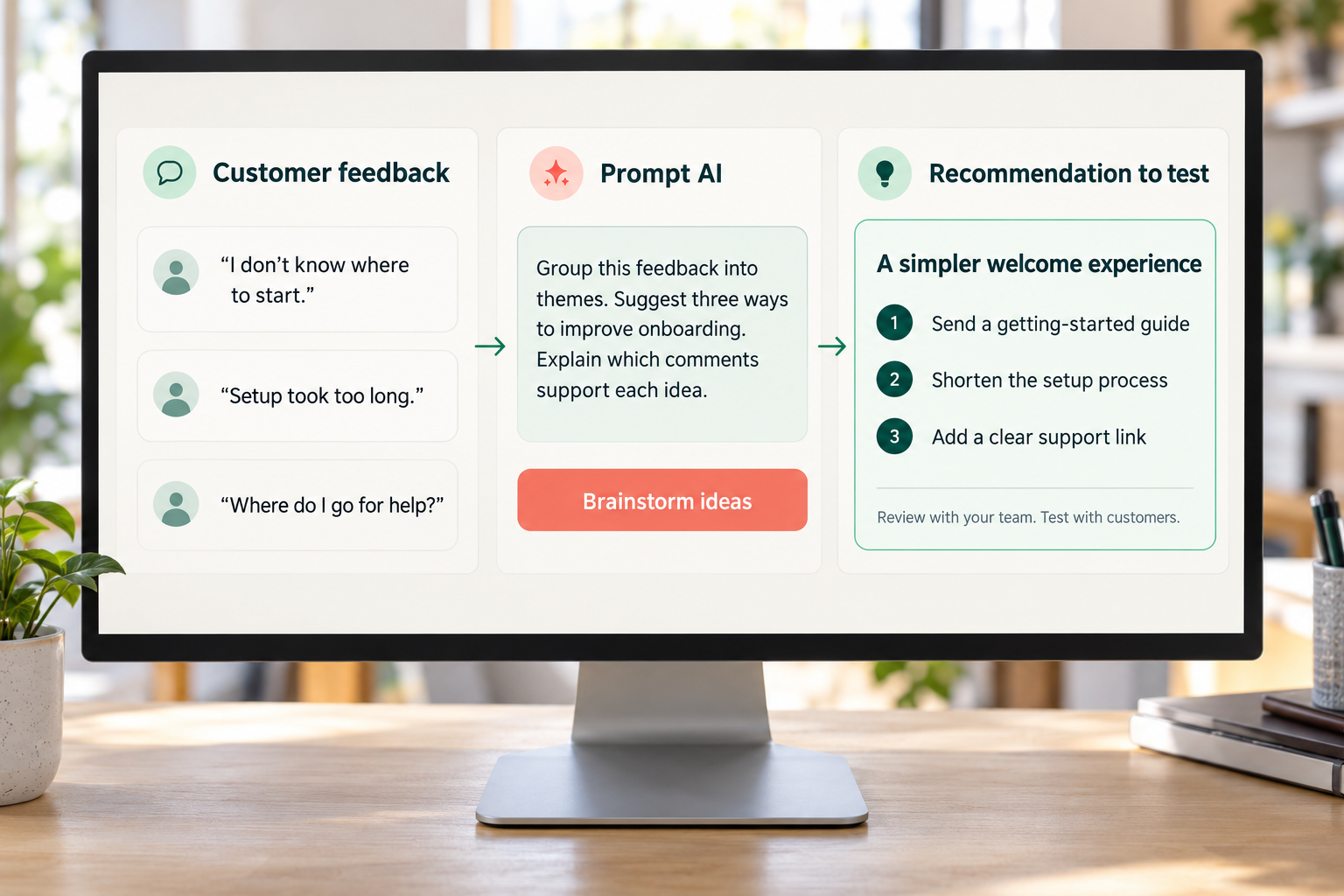
Large assignments are often easier to manage as a conversation.
Suppose you want to turn customer feedback into recommendations. You could ask for a complete strategy immediately, but it may be more useful to start with a simpler request:
Group these comments into recurring themes. Show which comments support each theme. Keep customer statements separate from your interpretation, and flag anything ambiguous.
You can then review the themes before asking for recommendations.
For writing, you might begin with an outline and agree on the structure before producing a draft. For a project plan, you could ask the assistant to identify missing information before proposing deadlines.
This creates natural review points. If it has misunderstood the assignment, you can correct that early.
It helps to tell the assistant how to handle gaps:
If the material does not support an answer, say what is missing. Do not invent details to complete the task.
That instruction can reduce unhelpful guessing, but it still needs a human check. Treat it as part of the brief rather than a guarantee.
Keep Human Judgment Involved in the Process
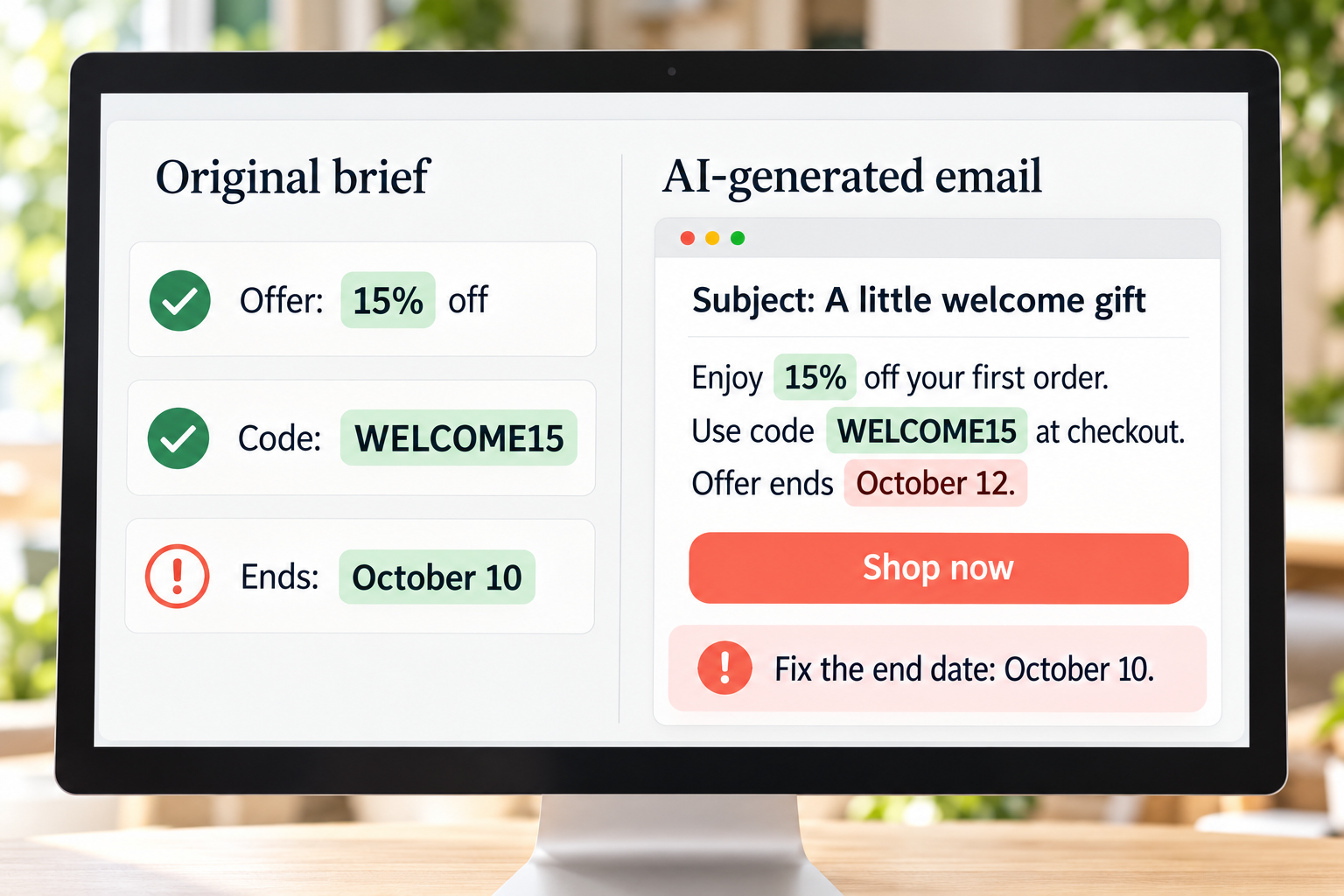
The quality of an AI response can be difficult to judge from its presentation. A well-written answer may contain an incorrect fact, a weak recommendation, or a number that was interpreted incorrectly.
NIST’s generative AI guidance identifies confidently presented false information, privacy risks, harmful bias, and risks from human reliance on AI. These are practical concerns for any business using the output in customer communication or decision-making.
A study involving Boston Consulting Group consultants illustrates why task selection and review matter. On tasks suited to the AI system tested, participants using it completed work 25.1% more quickly on average and produced better results. On a task outside its capabilities, AI users were 19% less likely to produce a correct solution.
The lesson is that success with one assignment does not establish reliability across everything else.
Human oversight brings knowledge of the business, the customer, and the consequences of getting something wrong. You may know that a policy has changed, that a recommendation is impractical, or that a promise would create expectations your team cannot meet.
For routine internal work, review may be brief. For material affecting health, finances, employment, contracts, or other consequential decisions, someone with the relevant expertise needs to assess it.
The person reviewing should have enough time and authority to question the output. Approval becomes less useful when it is treated as a quick click at the end.
Review Everything Before Polishing the Language
It’s easy to start editing sentences as soon as a draft arrives. Check the substance first.
Look at whether the response answers the assignment, uses the right information, and leaves out anything important. For factual claims, check the original source. A citation that looks real still needs to lead to a source that supports the statement.
For numerical work, check the inputs, formulas, and definitions. A calculation can be mathematically correct and still answer the wrong question.
For customer communication, check the policy, the promise, and the action you are asking the reader to take.
Then work on the language.
Give feedback that names the problem. “Make this better” leaves the assistant guessing again. You will usually get a more useful revision from something like:
The opening feels formal, and the second paragraph repeats the first. Combine them into a shorter introduction. Keep the explanation conversational and retain the practical example.
Or:
This recommendation goes further than the evidence supports. Explain what the data shows, identify the uncertainty, and remove the claim about what caused the result.
You can revise one section at a time. This helps preserve passages that already work and makes changes easier to compare.
For writing, reading a passage aloud is a useful final check. You will often hear phrases you would never use, awkward transitions, or a rhythm that makes the piece feel harder to read than it needs to be.
Know What Information You Can Share
Good output often depends on good context. That does not mean every document belongs in an AI tool.
Before sharing customer records, employee information, financial material, or client documents, check your organization’s approved tools, the applicable privacy settings, and the provider’s data-handling terms.
You may be able to complete the task with less information. To analyze common support questions, for example, you might remove names and contact details. To test a reporting process, you could begin with sample data.
Give a tool access that matches the assignment. Drafting an email does not require permission to send it. Reviewing a file does not necessarily require permission to modify the original.
There are other quality risks to watch for, too. Recommendations may reflect unfair assumptions. Generated copy may sound much like everyone else’s. A draft may include an offer, feature, or commitment that your business never approved.
A clear brief and a consistent review process help catch those problems before they reach the customer.
Work Out Whether You Are Actually Saving Time
The first response may take seconds. The task is finished only when the result is usable.
Measure the total time, including the brief, review, corrections, and final preparation. That gives you a more honest view of the benefit.
Here is an illustrative weekly example. These are sample figures, rather than research findings or promised savings.
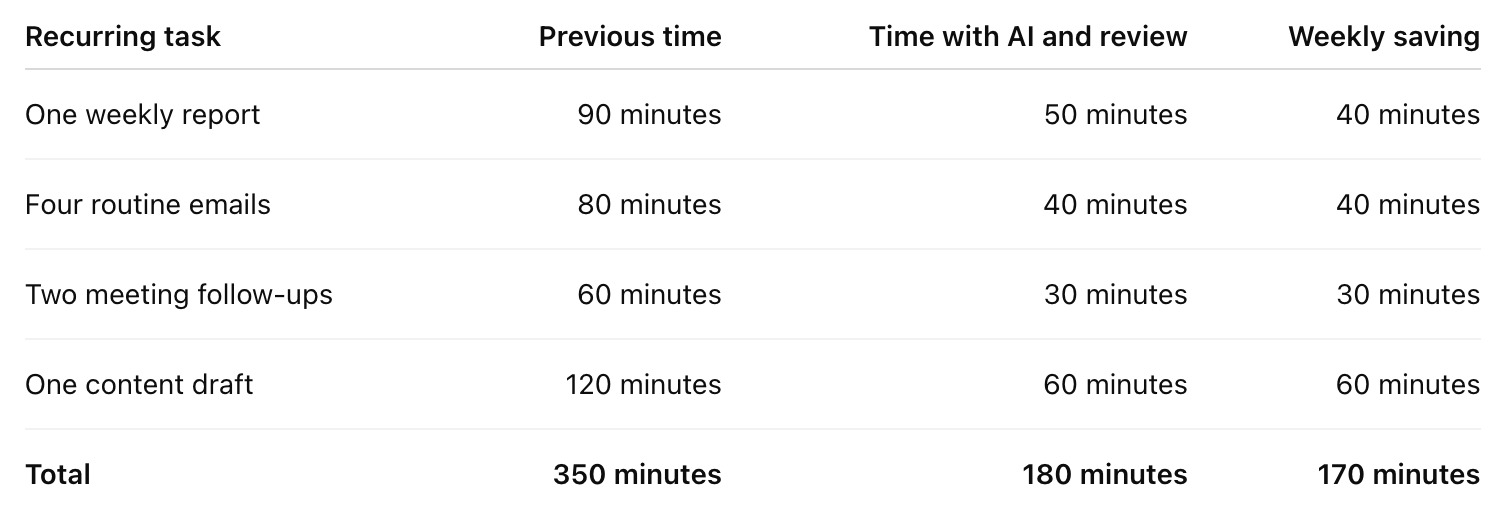
In this example, several ordinary tasks produce a saving of almost three hours per week.
Your results may be different. Some tasks will need more review than expected. Others may become much faster once you have a good prompt and an approved example.
Track a few attempts before deciding what to keep. If a task repeatedly needs extensive correction, change the approach or use AI for a smaller part of it.
Save What Works
Once you find a reliable process, keep the brief and the review steps together.
A simple reusable prompt can include the purpose, source material, required format, and checks needed before the output is used. Your team can adapt it for each assignment without starting over.
You might save a welcome-email brief, a meeting-summary format, or instructions for preparing a report. Include a good finished example when it helps.
For tasks that involve sending, publishing, or changing business records, keep a clear approval point. Reliability on draft work should be established before you give a tool responsibility for actions.
Start with one recurring task this week. Compare the finished result with your usual work, note how long the full process takes, and improve the brief where it falls short.
AI becomes useful through that repetition. You learn which tasks suit it, which instructions matter, and where your judgment needs to stay involved. Over time, a few dependable uses can give you back hours that would otherwise disappear into routine work.